
Self-Hosting Excalidraw: A Collaborative Whiteboard That Feels Like Paper
Most diagramming tools produce rigid, clinical-looking output. Excalidraw takes the opposite approach — everything looks hand-drawn. It sounds like a gimmick, but it changes how you use the tool. Diagrams feel more like sketches, which makes people less precious about them and more willing to iterate.
Photo by Zulfugar Karimov on Unsplash
Excalidraw is a virtual whiteboard for sketching diagrams, wireframes, architecture layouts, and anything else you'd draw on a physical whiteboard. It supports real-time collaboration, and you can self-host it for complete data control.
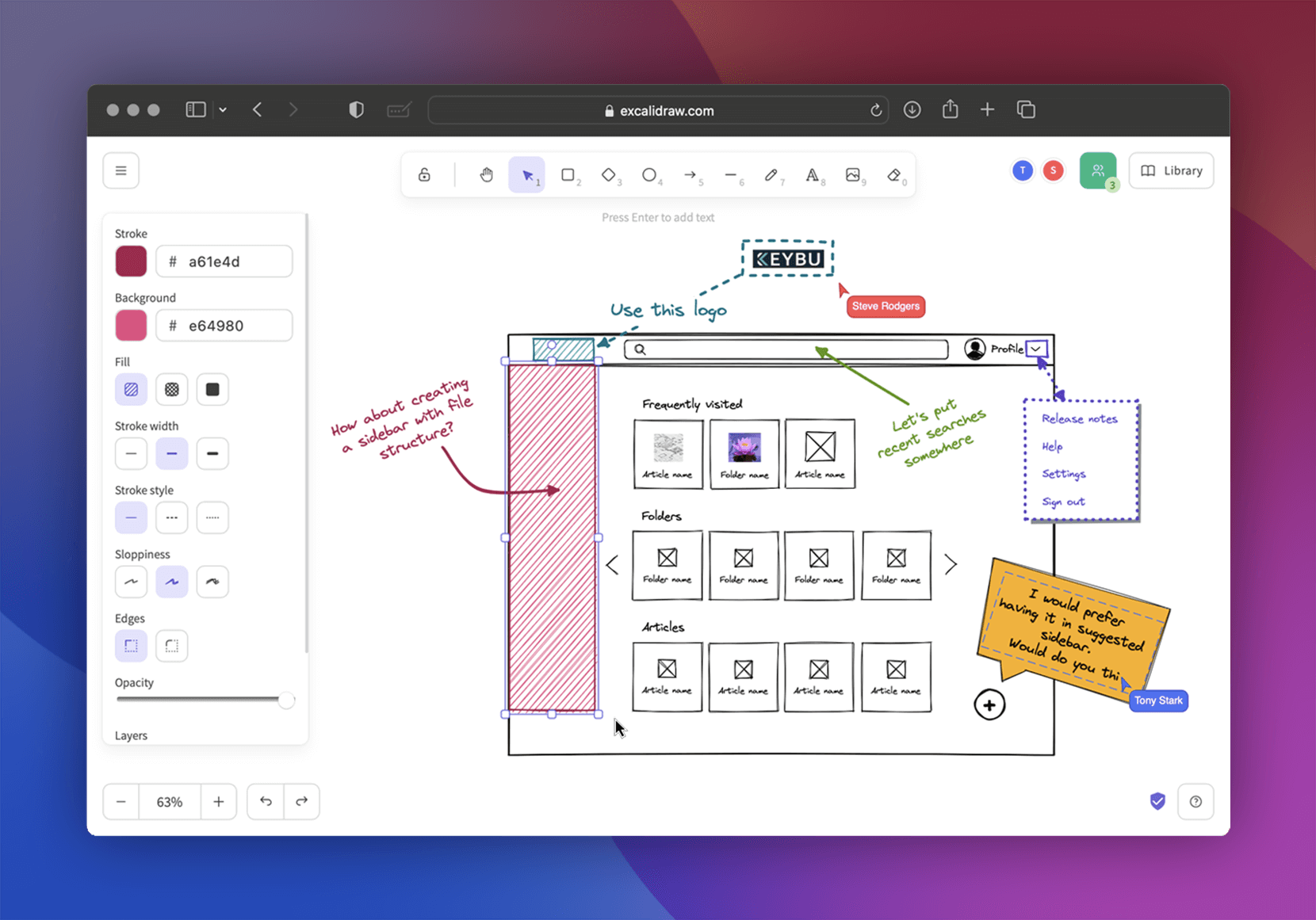
Why Excalidraw Works
Excalidraw's appeal comes from a few deliberate design choices:
- Hand-drawn aesthetic — diagrams look like sketches, not formal engineering drawings
- Zero learning curve — if you can use a whiteboard, you can use Excalidraw
- Real-time collaboration — multiple people draw simultaneously, Google Docs-style
- Fast — no lag, no loading spinners, works instantly in the browser
- Libraries — reusable component libraries for common shapes (AWS icons, flowcharts, UI components)
- Export options — PNG, SVG, and native
.excalidrawformat
When to use Excalidraw vs. formal tools
Excalidraw is ideal for:
- Architecture brainstorming
- Explaining concepts to teammates
- Quick wireframes and mockups
- Sequence diagrams and flowcharts
- Anything where "good enough" beats "pixel-perfect"
Use draw.io or Lucidchart instead when you need:
- Precise, formal technical diagrams
- UML diagrams with strict notation
- Complex network topology maps with exact positioning
- Documents that need to look polished and professional
Excalidraw vs. Draw.io vs. Miro
| Feature | Excalidraw | Draw.io (diagrams.net) | Miro |
|---|---|---|---|
| Self-hosted | Yes | Yes | No |
| Hand-drawn style | Yes (signature look) | Optional | No |
| Real-time collab | Yes | Limited (self-hosted) | Yes |
| Learning curve | None | Low | Low |
| Libraries | Community + custom | Extensive built-in | Templates |
| Offline support | Yes (PWA) | Yes | No |
| Export formats | PNG, SVG, JSON | PNG, SVG, PDF, XML | PNG, PDF |
| Resource usage | Very low | Low | N/A |
| Encryption | End-to-end (cloud) | N/A | N/A |
| Cost | Free | Free | $8+/user/mo |
Why this guide covers Excalidraw
Draw.io is more feature-rich for formal diagramming, but Excalidraw wins for collaborative whiteboarding. Most teams need both — use Excalidraw for brainstorming and quick sketches, draw.io for formal documentation.
Self-hosting Excalidraw also makes sense because the hosted version at excalidraw.com works fine for individuals, but collaboration requires a backend — and self-hosting gives you full control over that backend.
Self-Hosting Excalidraw: Setup
Server requirements
Excalidraw is extremely lightweight:
- Minimum: 256 MB RAM, 1 CPU core
- Recommended: 512 MB RAM, 1 CPU core
- Storage: Negligible (Excalidraw stores data in the browser by default)
The server mainly serves static files and handles WebSocket connections for real-time collaboration.
Docker Compose setup
version: "3.8"

services:
  excalidraw:
    container_name: excalidraw
    image: excalidraw/excalidraw:latest
    ports:
      - "3000:80"
    restart: always
    healthcheck:
      test: ["CMD", "wget", "--no-verbose", "--tries=1", "--spider", "http://localhost:80"]
      interval: 30s
      timeout: 10s
      retries: 3
Adding real-time collaboration
The base Excalidraw image serves the drawing app but doesn't include collaboration. For real-time collaboration, you need the room server:
version: "3.8"

services:
  excalidraw:
    container_name: excalidraw
    image: excalidraw/excalidraw:latest
    ports:
      - "3000:80"
    environment:
      VITE_APP_WS_SERVER_URL: "wss://excalidraw-ws.yourdomain.com"
    restart: always

  excalidraw-room:
    container_name: excalidraw-room
    image: excalidraw/excalidraw-room:latest
    ports:
      - "3001:80"
    restart: always
The room server handles WebSocket connections for live collaboration. Point VITE_APP_WS_SERVER_URL to wherever you expose the room server.
Starting Excalidraw
docker compose up -d
Access the whiteboard at http://your-server:3000.
Want more productivity guides? Get guides like this in your inbox — Self-Hosted Weekly delivers one free deep-dive every week.
Using Excalidraw
Basic drawing
Excalidraw's toolbar is minimal:
- Rectangle, ellipse, diamond, arrow, line — the basic shapes
- Text — click anywhere to type
- Freehand drawing — for sketching
- Selection — move and resize elements
Every shape can be connected with arrows. Click a shape's edge and drag to another shape — the arrow stays attached when you move things around.
Keyboard shortcuts worth knowing
| Shortcut | Action |
|---|---|
1-9 |
Select tools (rectangle, ellipse, etc.) |
V |
Selection tool |
L |
Lock selected tool (keep drawing multiple shapes) |
Ctrl+D |
Duplicate selected elements |
Ctrl+G |
Group selected elements |
Ctrl+Shift+G |
Ungroup |
Alt+drag |
Duplicate while dragging |
Ctrl+Shift+E |
Export to PNG |
Libraries
Libraries are collections of reusable components. To add a library:
- Click the book icon in the toolbar
- Browse the public library at libraries.excalidraw.com
- One-click install adds shapes to your toolbar
Popular libraries include:
- AWS architecture icons
- Kubernetes diagrams
- UI wireframe components
- Flowchart symbols
- Network topology icons
Collaboration
To collaborate in real-time:
- Click Live collaboration in the top-right
- Share the generated link with teammates
- Everyone draws on the same canvas simultaneously
- Each person gets a colored cursor with their name
Collaboration sessions are ephemeral — they exist as long as someone is connected. Save your work by exporting or copying to clipboard.
Embedding in documentation
Excalidraw diagrams can be embedded in:
- Markdown (GitHub, GitLab, Notion) — export as PNG/SVG and embed
- Obsidian — native Excalidraw plugin
- VS Code — Excalidraw extension lets you edit
.excalidrawfiles directly - Confluence — export as PNG and attach
The .excalidraw JSON format is human-readable and diffs well in Git, making it a good choice for diagrams stored alongside code.
Practical Architecture Diagrams
System architecture
Excalidraw excels at system architecture sketches:
- Draw boxes for each service (database, API, frontend, cache)
- Connect with arrows showing data flow
- Add labels for protocols (HTTP, gRPC, WebSocket)
- Group related services with dotted rectangles
- Color-code by concern (blue for compute, green for storage, orange for external)
The hand-drawn look actually helps here — it communicates "this is a sketch of the architecture" rather than "this is the definitive specification," which is usually more accurate.
Sequence diagrams
While not as formal as PlantUML or Mermaid, quick sequence diagrams work well:
- Draw vertical lines for each actor/service
- Draw horizontal arrows between them for messages
- Label each arrow with the request/response
- Use dotted arrows for async operations
Wireframes
For UI mockups, use the rectangle tool for containers and the text tool for labels. The hand-drawn style is actually an advantage — stakeholders focus on layout and flow rather than pixel-level design details.
Reverse Proxy Setup
For HTTPS (recommended for collaboration):
Caddy:
excalidraw.yourdomain.com {
    reverse_proxy localhost:3000
}

excalidraw-ws.yourdomain.com {
    reverse_proxy localhost:3001
}
Nginx:
server {
    server_name excalidraw.yourdomain.com;

    location / {
        proxy_pass http://localhost:3000;
        proxy_set_header Host $host;
        proxy_set_header X-Forwarded-Proto $scheme;
    }
}

server {
    server_name excalidraw-ws.yourdomain.com;

    location / {
        proxy_pass http://localhost:3001;
        proxy_http_version 1.1;
        proxy_set_header Upgrade $http_upgrade;
        proxy_set_header Connection "upgrade";
        proxy_set_header Host $host;
    }
}
WebSocket support is required for the collaboration server.
Data Storage and Privacy
By default, Excalidraw stores everything in the browser's local storage. This means:
- No server-side storage — your drawings never leave your browser unless you explicitly share them
- Clearing browser data deletes your drawings — export important work
- No accounts or login required — just open and draw
When using live collaboration, drawing data passes through the room server but is end-to-end encrypted in the official hosted version. For self-hosted instances, the encryption depends on your configuration.
Backing up drawings
Since Excalidraw uses browser storage, back up important work:
- Export as
.excalidraw— the native format, re-importable - Export as SVG — scalable, editable in other tools
- Save to Git —
.excalidrawfiles are JSON and diff cleanly
Honest Trade-offs
Excalidraw is great if you:
- Want a fast, zero-friction whiteboard
- Prefer the hand-drawn aesthetic
- Need real-time collaboration
- Want something lightweight (< 256 MB RAM)
- Work in teams that sketch architectures together
Consider draw.io instead if you:
- Need formal, precise diagrams
- Want extensive built-in shape libraries
- Need PDF export
- Prefer a traditional diagramming tool
- Don't need real-time collaboration
Consider Miro instead if you:
- Need a full workshop/brainstorming platform
- Want sticky notes, voting, timers, and facilitation tools
- Don't want to self-host
The bottom line: Excalidraw fills a specific niche — fast, collaborative, informal diagramming — and fills it exceptionally well. It's not trying to replace formal diagramming tools. If you've ever wished you could share a whiteboard sketch with a remote teammate, Excalidraw is exactly what you want.