
Self-Hosting Changedetection.io: Monitor Any Website for Changes
You're watching a product page for a price drop. Or monitoring a government website for policy updates. Or waiting for a job posting to appear. You could check manually every day — or you could let a self-hosted tool do it.
Photo by Centre for Ageing Better on Unsplash
Changedetection.io monitors web pages and notifies you when something changes. It's like a personal web scraper that watches pages for you and sends alerts via email, Slack, Discord, Telegram, or dozens of other channels.
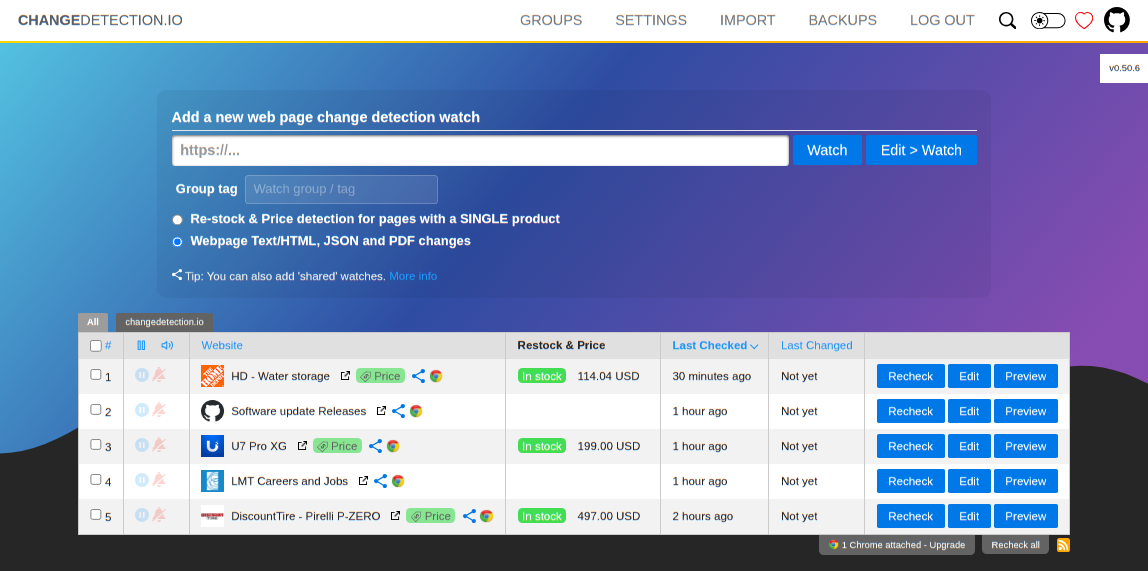
What Changedetection.io Does
At its core, changedetection.io:
- Fetches a web page at regular intervals
- Compares the current version to the previous version
- Highlights what changed (additions, removals, modifications)
- Sends you a notification if something changed
It handles the complexity that makes this harder than it sounds:
- JavaScript-rendered pages — can use a headless browser (Playwright) for SPAs
- Visual diffing — screenshot comparison for pages where text extraction fails
- CSS/XPath filtering — watch only specific parts of a page, ignore the noise
- Notification routing — different alerts for different watches
- Change history — browse past versions of any watched page
Changedetection.io vs. Alternatives
| Feature | Changedetection.io | Visualping | Distill.io |
|---|---|---|---|
| Self-hosted | Yes | No | No (browser ext.) |
| Free tier | Unlimited (self-hosted) | 5 pages | 25 checks/month |
| JavaScript support | Yes (via Playwright) | Yes | Yes |
| Visual diff | Yes | Yes | Limited |
| CSS/XPath filters | Yes | No | Yes |
| Notification channels | 90+ (via Apprise) | Email, Slack | Email, SMS |
| API | Yes | Yes | No |
| Check frequency | Any (1 min+) | 5 min+ (paid) | 5 min+ |
| Cost | Free + hardware | $10+/mo | $15+/mo |
Why self-host
The free tiers on commercial services are extremely limited. Changedetection.io lets you monitor unlimited pages at any frequency you want, with no restrictions.
Self-Hosting Changedetection.io: Setup
Server requirements
- Minimum: 256 MB RAM, 1 CPU core (for basic HTML fetching)
- With Playwright (for JavaScript pages): 1 GB RAM, 2 CPU cores
- Storage: 100 MB base + ~1 MB per watched page per month of history
Docker Compose setup
Basic setup (HTML pages only):
version: "3.8"

services:
  changedetection:
    container_name: changedetection
    image: ghcr.io/dgtlmoon/changedetection.io:latest
    ports:
      - "5000:5000"
    volumes:
      - changedetection-data:/datastore
    environment:
      BASE_URL: "http://your-server:5000"
    restart: always

volumes:
  changedetection-data:
Full setup (with JavaScript rendering via Playwright):
version: "3.8"

services:
  changedetection:
    container_name: changedetection
    image: ghcr.io/dgtlmoon/changedetection.io:latest
    ports:
      - "5000:5000"
    volumes:
      - changedetection-data:/datastore
    environment:
      PLAYWRIGHT_DRIVER_URL: "ws://playwright-chrome:3000"
      BASE_URL: "http://your-server:5000"
    depends_on:
      - playwright-chrome
    restart: always

  playwright-chrome:
    container_name: playwright-chrome
    image: browserless/chrome:latest
    restart: always
    environment:
      SCREEN_WIDTH: 1920
      SCREEN_HEIGHT: 1080
      MAX_CONCURRENT_SESSIONS: 5

volumes:
  changedetection-data:
Starting the service
docker compose up -d
Access the web interface at http://your-server:5000.
Want more monitoring guides? Get guides like this in your inbox — Self-Hosted Weekly delivers one free deep-dive every week.
Adding Your First Watch
- Click Add Watch in the top-right
- Enter the URL you want to monitor
- Set the check interval (e.g., every 30 minutes)
- Click Save
Changedetection.io will fetch the page immediately and set it as the baseline. On subsequent checks, it compares the new version against the previous and flags changes.
Filtering with CSS selectors
Most pages have headers, footers, ads, and other noise that changes constantly. Use CSS selectors to watch only what matters:
- Price on a product page:
div.priceorspan.product-price - Job listings:
div.job-listingorul.positions - Article content:
articleordiv.content - Specific text:
h1.titleorp.status-message
Set the CSS filter in the watch settings under Filters & Triggers → CSS/JSON/XPath Filter.
XPath filtering
For more precise targeting:
//div[@class="price"]/span
//table[@id="results"]//tr
//*[contains(@class, "status")]
Text filtering
You can also filter by text content:
- Include only lines containing: useful for keyword monitoring
- Ignore lines containing: filter out noise like timestamps and view counts
Notification Setup
Changedetection.io uses Apprise for notifications, which supports 90+ services out of the box.
Common notification URLs
Email (SMTP):
mailto://user:[email protected][email protected]
Slack:
slack://tokenA/tokenB/tokenC/#channel
Discord:
discord://webhook_id/webhook_token
Telegram:
tgram://bot_token/chat_id
Gotify:
gotify://your-server:8080/app_token
ntfy:
ntfy://your-server/topic
Set notifications globally (for all watches) in Settings → Notification URL, or per-watch for targeted alerts.
Notification content
Notifications include:
- The watch title and URL
- A summary of what changed
- A link to the diff view in changedetection.io
Practical Use Cases
Price monitoring
Watch product pages for price drops:
- Add the product URL
- Set a CSS filter for the price element (e.g.,
span.price) - Set check frequency to every hour
- Optionally set a trigger — only notify if the price contains a specific pattern
Job board monitoring
Watch company career pages:
- Add the careers/jobs page URL
- Filter to the job listings container
- Check every 30 minutes
- Get notified when new positions appear
Government and regulatory changes
Monitor government websites for policy updates, license status changes, or filing confirmations:
- Add the relevant page URL
- Use JavaScript fetching if the page requires it
- Filter to the status/content area
- Check every few hours
Competitor monitoring
Track changes on competitor websites:
- Pricing page updates
- New product announcements
- Blog posts and press releases
- Feature page changes
Stock and availability
Monitor product availability:
- Add the product page
- Filter to the "add to cart" or availability status element
- Set high-frequency checks (every 5-15 minutes)
- Get notified when it changes from "out of stock" to "available"
Advanced Features
Visual diffing
For pages where text extraction doesn't capture the changes well:
- Enable Visual Diff in watch settings
- Changedetection.io takes screenshots and compares them pixel-by-pixel
- Changed regions are highlighted in the diff view
This requires the Playwright browser and uses more resources.
JSON API monitoring
Changedetection.io can monitor JSON APIs directly:
- Set the fetch method to the API URL
- Use JSONPath filters (e.g.,
$.data.priceor$.results[0].status) - Get notified when specific JSON values change
This is useful for monitoring APIs that serve data you care about.
Triggers and conditions
Instead of notifying on every change, set conditions:
- Text must appear: Only notify when a specific word or phrase appears on the page
- Text must not appear: Notify when something disappears (e.g., "sold out" removed)
- CSS filter must match: Only watch a specific section
Proxies
For pages that block frequent automated access:
environment:
  HTTP_PROXY: "http://proxy:8080"
  HTTPS_PROXY: "http://proxy:8080"
Or configure per-watch proxies in the settings.
Reverse Proxy Setup
Caddy:
changes.yourdomain.com {
    reverse_proxy localhost:5000
}
Nginx:
server {
    server_name changes.yourdomain.com;

    location / {
        proxy_pass http://localhost:5000;
        proxy_set_header Host $host;
        proxy_set_header X-Real-IP $remote_addr;
        proxy_set_header X-Forwarded-For $proxy_add_x_forwarded_for;
        proxy_set_header X-Forwarded-Proto $scheme;
    }
}
Authentication
Changedetection.io has built-in password protection:
- Go to Settings → General
- Set a password
- All access to the web interface will require the password
For additional security behind a reverse proxy, add HTTP basic auth or use an auth provider like Authelia.
Resource Management
Managing check frequency
Be considerate with check frequency:
- Don't hammer small websites with 1-minute checks — you might get blocked
- 5-15 minutes is reasonable for most use cases
- 30-60 minutes for pages that change slowly (government sites, company pages)
- 1-5 minutes only for large commercial sites that can handle it (Amazon, eBay)
Cleaning up history
Over time, change history accumulates. Manage it in Settings:
- Set a maximum number of snapshots per watch
- Periodically delete old watches you no longer need
- The database is SQLite-based and handles cleanup automatically
Honest Trade-offs
Changedetection.io is great if you:
- Want to monitor websites without depending on commercial services
- Need to watch more pages than free tiers allow
- Want flexible notification options (90+ channels)
- Need JavaScript rendering support for modern websites
- Want full control over check frequency
Consider commercial alternatives if you:
- Need visual diffing at scale (Visualping has a better UI for this)
- Don't want to manage a server
- Need mobile app support (changedetection.io is web-only)
- Need team collaboration features (shared dashboards, assignments)
Consider writing custom scripts if you:
- Need to monitor just one or two pages
- Need complex extraction logic (regex, multi-step scraping)
- Want tighter integration with your existing automation
The bottom line: Changedetection.io solves a common problem — "tell me when this page changes" — with a clean UI and impressive flexibility. The Playwright integration handles JavaScript-heavy sites that simpler tools can't, and the Apprise notification system means you can get alerts wherever you want them. For personal and small-team use, it's the best self-hosted option available.