
Self-Hosting Actual Budget: A Local-First Alternative to YNAB
YNAB changed how a lot of people think about money. The envelope budgeting method — give every dollar a job — genuinely works. But YNAB costs $99/year, runs entirely in their cloud, and has made pricing decisions that frustrated long-time users. Actual Budget offers the same methodology with a fundamentally different architecture: your data lives on your devices first, with an optional sync server you control.
Photo by alex Roosso on Unsplash
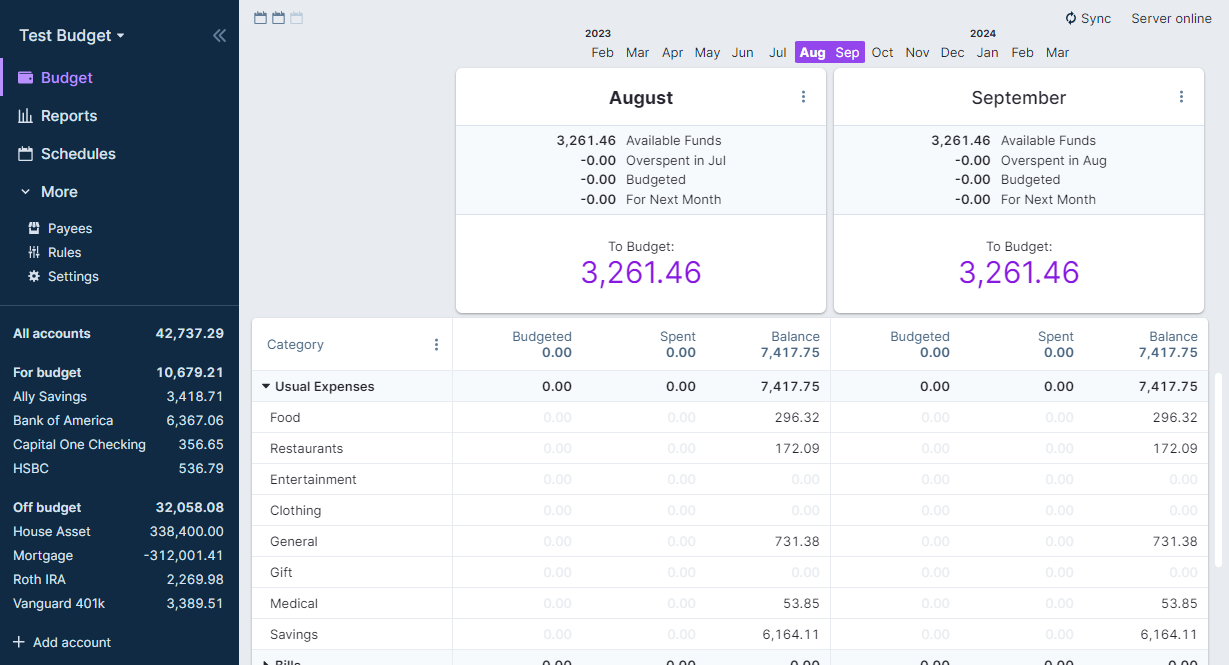
Actual Budget is an open source, local-first personal finance application built around zero-sum (envelope) budgeting. Your budget data is stored locally in the browser or desktop app, and a self-hosted sync server lets you keep multiple devices in sync without sending your financial data to a third party.
Why Actual Budget Stands Out
Actual Budget's core design philosophy is local-first:
- Data lives on your device — the app works offline, with no server required for basic use
- Sync is optional — the server just coordinates changes between devices
- Zero-sum budgeting — every dollar of income gets assigned to a category before you spend it
- Fast — built with performance in mind, handles thousands of transactions without lag
- Import/export — supports OFX, QFX, QIF, and CSV transaction imports
- Bank sync — automated transaction imports via GoCardless (EU) and SimpleFIN (US/Canada)
- Cross-platform — web app, desktop (Electron), and the sync server ties them together
The envelope budgeting method
If you're new to envelope budgeting, the idea is simple:
- When income arrives, you distribute it across budget categories (rent, groceries, entertainment, savings)
- Each category has a balance — when it hits zero, you stop spending in that category or move money from another
- You're always working with money you already have, never budgeting future income you haven't received
This approach eliminates the common trap of spending money you think you'll earn next month. It forces you to make explicit tradeoffs: "I can eat out this week, but then I need to reduce my clothing budget."
Actual Budget vs. YNAB vs. Firefly III
| Feature | Actual Budget | YNAB | Firefly III |
|---|---|---|---|
| Self-hosted | Yes | No | Yes |
| Local-first | Yes | No (cloud-only) | No (server-only) |
| Budgeting method | Zero-sum/envelope | Zero-sum/envelope | Flexible |
| Bank sync | GoCardless, SimpleFIN | Direct (US banks) | Spectre, Salt Edge |
| Offline support | Full | Limited | No |
| Mobile app | Web (PWA) | Native iOS/Android | Web (PWA) |
| Multi-currency | Basic | Yes | Yes |
| Reporting | Good | Excellent | Excellent |
| API | Yes | Yes | Yes |
| Learning curve | Low | Low | Moderate |
| Cost | Free (self-hosted) | $99/year | Free (self-hosted) |
| Data ownership | Full | Intuit (YNAB parent) | Full |
When to choose which
Actual Budget is best if you want envelope budgeting with full data ownership and offline support. It's the closest self-hosted equivalent to YNAB.
YNAB is best if you want a polished experience with native mobile apps and direct bank connections, and you're comfortable paying for a cloud service.
Firefly III is best if you want a full-featured financial management system beyond budgeting — it handles asset tracking, recurring transactions, piggy banks, and detailed reporting. It's more of a personal accounting system than a pure budgeting tool.
Self-Hosting Actual Budget: Setup
Server requirements
The sync server is lightweight — it only handles syncing changes between devices, not running the app itself:
- Minimum: 256 MB RAM, 1 CPU core
- Recommended: 512 MB RAM, 1 CPU core
- Storage: 50 MB base + roughly 10 MB per budget file
Docker Compose setup
services:
  actual-budget:
    container_name: actual-budget
    image: actualbudget/actual-server:latest
    ports:
      - "5006:5006"
    volumes:
      - actual-data:/data
    restart: always
    healthcheck:
      test: ["CMD", "wget", "--no-verbose", "--tries=1", "--spider", "http://localhost:5006"]
      interval: 30s
      timeout: 10s
      retries: 3

volumes:
  actual-data:
Starting the service
docker compose up -d
Access Actual Budget at http://your-server:5006. On first visit, you'll create a password for the sync server, then either create a new budget or import an existing one.
Configuration
Actual Budget is configured through environment variables on the sync server:
services:
  actual-budget:
    container_name: actual-budget
    image: actualbudget/actual-server:latest
    ports:
      - "5006:5006"
    volumes:
      - actual-data:/data
    environment:
      ACTUAL_UPLOAD_FILE_SYNC_SIZE_LIMIT_MB: "20"
      ACTUAL_UPLOAD_SYNC_ENCRYPTED_FILE_SYNC_SIZE_LIMIT_MB: "50"
      ACTUAL_UPLOAD_FILE_SIZE_LIMIT_MB: "20"
    restart: always
Most users won't need to change these defaults. The limits control maximum file sizes for budget sync.
Want more productivity guides? Get guides like this in your inbox — Self-Hosted Weekly delivers one free deep-dive every week.
Getting Started with Budgeting
Setting up categories
Start with broad categories and refine over time:
- Fixed expenses — rent/mortgage, insurance, subscriptions, loan payments
- Variable necessities — groceries, utilities, gas, medical
- Discretionary — dining out, entertainment, hobbies, clothing
- Savings goals — emergency fund, vacation, large purchases
- Irregular expenses — car maintenance, annual subscriptions, gifts
Group related categories into category groups for a cleaner view.
Importing transactions
Actual Budget supports multiple import formats:
- OFX/QFX — most US banks offer this in their transaction download options
- QIF — older format, widely supported
- CSV — universal fallback, requires column mapping
To import: open your budget, go to an account, click Import, and select your file. Actual will attempt to match the format automatically.
Migrating from YNAB
If you're leaving YNAB, Actual Budget has a direct YNAB4 importer and community tools for nYNAB (the current cloud version):
- Export your YNAB budget (Settings > Export Budget in YNAB4, or use the YNAB API for nYNAB)
- In Actual Budget, go to File > Import and select the YNAB format
- Categories, accounts, and transactions will be mapped over
- Review the imported data — some manual cleanup may be needed for payees and category names
Bank Sync
Automated transaction imports eliminate manual data entry:
GoCardless (Europe)
GoCardless provides open banking connections for European banks:
- Go to Settings > Bank Sync in Actual Budget
- Follow the GoCardless setup flow to link your bank
- Transactions sync automatically on a schedule
- Review and categorize imported transactions
GoCardless is free for personal use and supports most major European banks.
SimpleFIN (US and Canada)
SimpleFIN bridges the gap for North American banks:
- Sign up for a SimpleFIN account ($1.50/month per connection)
- Link your bank through SimpleFIN's interface
- Connect SimpleFIN to Actual Budget via the settings
- Transactions flow in automatically
Manual sync workflow
If bank sync isn't available for your institution, a manual workflow works well:
- Download transactions from your bank weekly (OFX/CSV)
- Import into Actual Budget
- Categorize and reconcile
- Takes 5-10 minutes per week for most people
Multi-Device Sync
The self-hosted server's primary job is keeping devices in sync:
- Open Actual Budget on each device and point it to your server URL
- Log in with your sync password
- Open the same budget file on each device
- Changes made on one device appear on others within seconds when connected
The local-first architecture means each device has a complete copy of your budget. If the server goes down, you can keep working — changes sync when the server comes back.
End-to-end encryption
Actual Budget supports optional end-to-end encryption for sync:
- Go to Settings > Encryption
- Set an encryption key
- All budget data is encrypted before leaving your device
- The sync server only stores encrypted blobs it cannot read
This means even if someone accesses your server, they cannot read your financial data without the encryption key.
Reverse Proxy Setup
For HTTPS access (recommended, especially with bank sync):
Caddy:
budget.yourdomain.com {
    reverse_proxy localhost:5006
}
Nginx:
server {
    server_name budget.yourdomain.com;

    location / {
        proxy_pass http://localhost:5006;
        proxy_set_header Host $host;
        proxy_set_header X-Real-IP $remote_addr;
        proxy_set_header X-Forwarded-For $proxy_add_x_forwarded_for;
        proxy_set_header X-Forwarded-Proto $scheme;
    }
}
HTTPS is strongly recommended if you're syncing over the internet rather than a local network.
Backup Strategy
Since Actual Budget is local-first, backup works on two levels:
Client-side
Each device has a full copy of your budget. The desktop app stores data in its application directory. You can also export your budget as a file from File > Export.
Server-side
The sync server stores budget files in the /data directory. Back it up like any Docker volume:
# Stop the container before backing up
docker compose stop actual-budget

# Backup the data volume
docker run --rm -v actual-data:/data -v $(pwd):/backup alpine tar czf /backup/actual-backup-$(date +%Y%m%d).tar.gz /data

# Restart
docker compose start actual-budget
Or simply use your existing volume backup strategy (restic, borg, etc.).
Honest Trade-offs
Actual Budget is great if you:
- Want YNAB-style envelope budgeting without the subscription
- Care about data ownership and privacy
- Want offline access to your budget
- Prefer a focused budgeting tool over a full accounting system
- Want multi-device sync on your own infrastructure
Consider YNAB instead if you:
- Want polished native mobile apps
- Need direct US bank connections without third-party bridges
- Value a large community with educational resources and support
- Don't want to manage any infrastructure
Consider Firefly III instead if you:
- Need multi-currency support as a core feature
- Want detailed financial reporting and analytics
- Prefer a traditional accounting approach over envelope budgeting
- Need to track investments, assets, and liabilities alongside your budget
The bottom line: Actual Budget is the best self-hosted option for people who like how YNAB works but want to own their data. The local-first architecture is genuinely well-designed — it's not just "YNAB but self-hosted," it's a thoughtful approach to personal finance software that happens to give you full control. The community is active, bank sync is improving steadily, and the core budgeting experience is already excellent.