
Self-Hosting n8n: Build Powerful Workflow Automations Without Code
You're running a homelab with a dozen services. Every day there's a manual task: check if backups ran, post a summary to Discord, sync data between apps, process incoming emails. Each task takes five minutes, but there are ten of them, and they never stop.
Photo by Domaintechnik Ledl.net on Unsplash
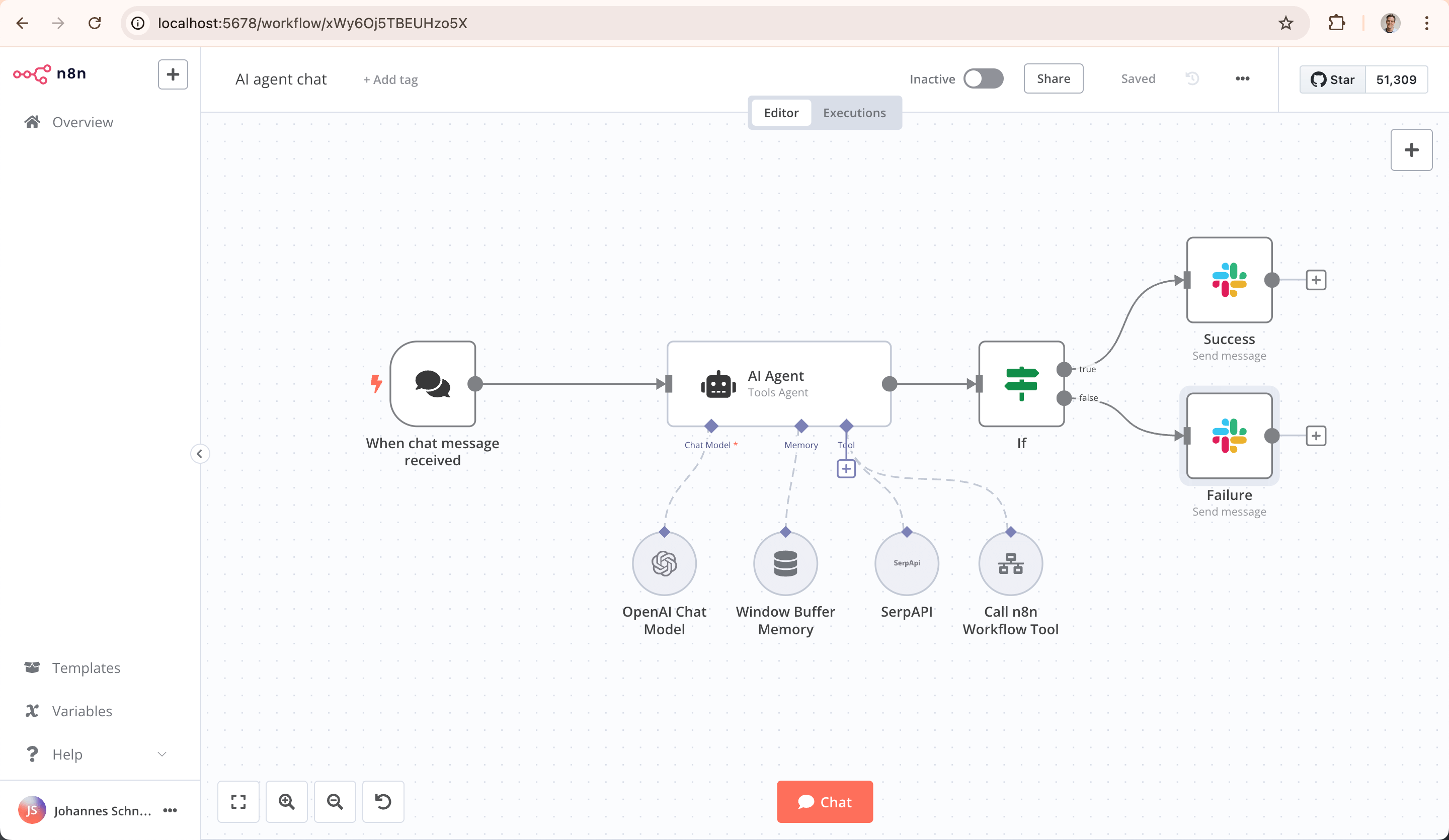
n8n is a workflow automation platform — the self-hosted answer to Zapier and Make. It connects your services with a visual node-based editor, triggers workflows on schedules or events, and handles the plumbing between APIs so you don't have to write scripts for every integration.
Self-hosting n8n gives you unlimited workflows, unlimited executions, and full control over your data. Zapier charges $20-600/month depending on usage. n8n costs nothing but the Docker container.
What n8n Does Well
- Visual workflow builder — Drag and connect nodes, no code required for most automations
- 400+ integrations — Pre-built nodes for popular services (Slack, Discord, GitHub, Google Sheets, databases, HTTP/REST, and more)
- Code when needed — JavaScript/Python nodes for custom logic
- Webhook triggers — Receive data from any service that can send webhooks
- Error handling — Retry logic, error workflows, and execution history
- Credential management — Securely store API keys and tokens
- Self-hosted — Your data, your workflows, your infrastructure
Docker Deployment
# docker-compose.yml
services:
  n8n:
    image: n8nio/n8n:latest
    ports:
      - "5678:5678"
    volumes:
      - n8n_data:/home/node/.n8n
    environment:
      - N8N_HOST=n8n.yourdomain.com
      - N8N_PROTOCOL=https
      - WEBHOOK_URL=https://n8n.yourdomain.com/
      - DB_TYPE=postgresdb
      - DB_POSTGRESDB_HOST=db
      - DB_POSTGRESDB_PORT=5432
      - DB_POSTGRESDB_DATABASE=n8n
      - DB_POSTGRESDB_USER=n8n
      - DB_POSTGRESDB_PASSWORD=n8npass
      - N8N_ENCRYPTION_KEY=your-random-encryption-key
      - GENERIC_TIMEZONE=America/Los_Angeles
    depends_on:
      - db
    restart: unless-stopped

  db:
    image: postgres:16
    volumes:
      - n8n_db:/var/lib/postgresql/data
    environment:
      - POSTGRES_DB=n8n
      - POSTGRES_USER=n8n
      - POSTGRES_PASSWORD=n8npass
    restart: unless-stopped

volumes:
  n8n_data:
  n8n_db:
docker compose up -d
n8n is available at http://your-server:5678. Create your first account on the setup screen.
Critical settings:
WEBHOOK_URLmust match your public URL exactly, or webhook triggers won't workN8N_ENCRYPTION_KEYencrypts stored credentials. Generate withopenssl rand -hex 32. Save this key — losing it means losing access to all stored credentials- PostgreSQL is strongly recommended for production. The default SQLite works for testing but doesn't handle concurrent executions well
Building Your First Workflow
Example: Daily backup status to Discord
- Click Add workflow
- Add a Schedule Trigger node — set to daily at 8:00 AM
- Add an Execute Command node — run
restic snapshots --json --latest 1 --repo /backup - Add a Code node — parse the JSON output and format a message
- Add a Discord node — post the formatted message to your monitoring channel
Connect the nodes in sequence: Schedule -> Execute Command -> Code -> Discord.
Example: Webhook receiver for Gitea
- Add a Webhook node (this creates a URL like
https://n8n.yourdomain.com/webhook/abc123) - Configure Gitea to send push webhooks to that URL
- Add processing nodes: parse the payload, run deploy commands, notify on success/failure
Want more automation guides? Get guides like this in your inbox — Self-Hosted Weekly delivers one free deep-dive every week.
Practical Automations for Self-Hosters
Infrastructure monitoring
Schedule (every 5m)
  → HTTP Request (check each service URL)
  → IF (status != 200)
  → Discord (send alert)
Automated Docker updates
Schedule (weekly)
  → Execute Command (docker compose pull)
  → IF (images updated)
  → Execute Command (docker compose up -d)
  → Discord (notify about updates)
RSS to Discord/Telegram
RSS Feed Trigger (check every hour)
  → IF (contains keywords)
  → Discord/Telegram (post new items)
Email processing
IMAP Email Trigger
  → IF (from specific sender)
  → Extract attachments
  → Upload to Nextcloud
  → Send confirmation reply
Database backup monitoring
Schedule (daily at 9 AM)
  → Execute Command (check backup timestamps)
  → IF (backup older than 25 hours)
  → Email + Discord (alert: backup may have failed)
Credential Management
n8n stores credentials encrypted in the database. Add credentials in Settings > Credentials:
- Click Add Credential
- Select the service type (Discord, Slack, PostgreSQL, HTTP Header Auth, etc.)
- Enter the authentication details
- n8n encrypts and stores them
Reference credentials in workflow nodes by selecting them from a dropdown. Credentials are never exposed in workflow exports — they're referenced by ID, not value.
Error Handling
Retry on failure
Configure any node to retry on failure:
- Click the node
- Go to Settings > On Error
- Set Retry On Fail with max retries and wait time
Error workflow
Create a dedicated error-handling workflow:
- Build a workflow that sends notifications (email, Discord) with error details
- In Settings > Error Workflow, select this workflow
- Any failed execution in any workflow triggers your error handler
This is a critical setup step. Without it, workflows fail silently.
Execution history
n8n keeps a log of every execution. Go to Executions to see:
- When each workflow ran
- Whether it succeeded or failed
- The data at each node (for debugging)
- Execution duration
Set EXECUTIONS_DATA_PRUNE=true and EXECUTIONS_DATA_MAX_AGE=168 (hours) to automatically clean up old execution data.
Webhook Security
Webhooks are publicly accessible URLs. Secure them:
Authentication header
In the webhook node, enable Authentication and set a header token. Configure the sending service to include this header.
IP whitelisting
Put n8n behind a reverse proxy and restrict webhook paths to known IPs:
# Caddy example
n8n.yourdomain.com {
    @webhooks path /webhook/*
    @gitea_webhook {
        path /webhook/*
        remote_ip 10.0.0.5
    }
    handle @gitea_webhook {
        reverse_proxy n8n:5678
    }
    handle {
        reverse_proxy n8n:5678
    }
}
n8n vs Zapier vs Huginn
| Feature | n8n | Zapier | Huginn |
|---|---|---|---|
| Pricing | Free (self-hosted) | $20-600+/month | Free (self-hosted) |
| Interface | Visual editor | Visual editor | Code + web UI |
| Integrations | 400+ | 6,000+ | Agent-based (custom) |
| Code nodes | JS + Python | Limited | Ruby |
| Webhooks | Yes | Yes | Yes |
| Error handling | Built-in | Basic | Manual |
| Community | Growing fast | Massive | Small |
| Self-hosted | Yes | No | Yes |
| Learning curve | Low-Medium | Low | High |
When to choose n8n
- You want visual workflow building with the option to add code
- You need unlimited executions without per-task pricing
- You want your automation data on your own infrastructure
- You need webhook receivers for custom integrations
When to choose Zapier
- You need integrations with niche SaaS products
- You don't want to maintain infrastructure
- Your automation volume is low (under 750 tasks/month on the starter plan)
Production Tips
Resource usage
n8n itself is lightweight (~200 MB RAM). Resource usage scales with:
- Number of concurrent workflow executions
- Size of data being processed
- Complexity of code nodes
For a typical homelab (10-20 workflows), 512 MB RAM is sufficient.
Backup your workflows
Export workflows as JSON regularly:
# Using the n8n CLI
docker exec n8n-n8n-1 n8n export:workflow --all --output=/home/node/.n8n/backups/

# Or use the API
curl -H 'X-N8N-API-KEY: your-api-key' \
  'https://n8n.yourdomain.com/api/v1/workflows' > workflows-backup.json
Community workflows
Browse community-shared workflows at n8n.io/workflows. You can import these directly into your instance. Common templates include:
- Slack/Discord notification workflows
- Data synchronization between apps
- Scheduled report generators
- RSS/social media automation
The Bottom Line
n8n is the self-hosted automation platform that hits the sweet spot between "write a bash script" and "pay Zapier $50/month." The visual editor makes simple automations accessible, the code nodes handle complex logic, and the webhook support lets you connect anything that can make an HTTP request. Deploy it alongside your other self-hosted services and start automating the repetitive tasks that eat your time every week.