Self-Hosting Immich: A Google Photos Replacement That Actually Works
Google Photos changed its unlimited storage policy in 2021, and since then, self-hosters have been looking for alternatives. Most fell short — clunky interfaces, no mobile apps, missing features. Then Immich arrived.
Photo by Justin Morgan on Unsplash
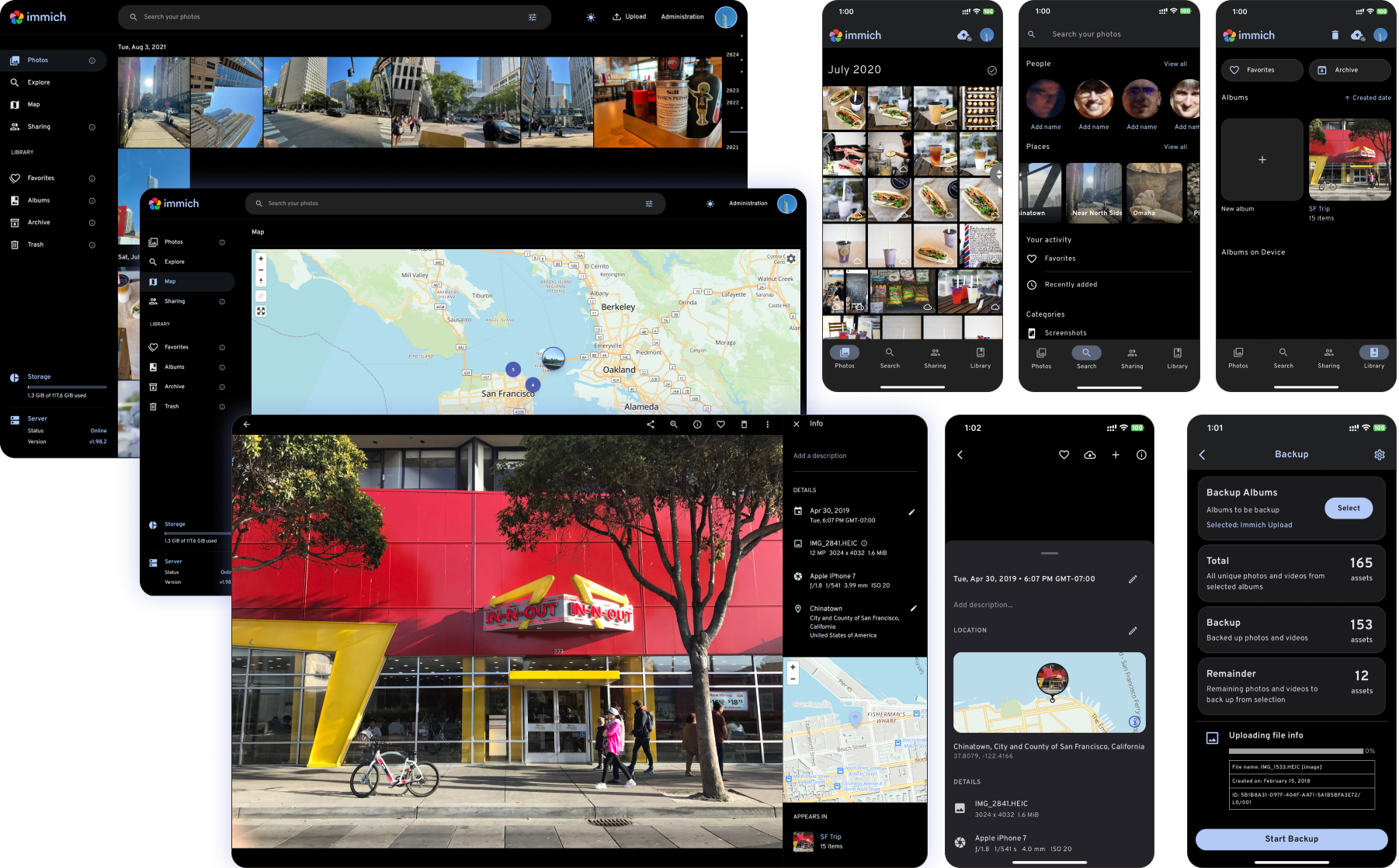
Immich is a self-hosted photo and video management solution that genuinely feels like Google Photos. It has mobile apps, automatic backup, facial recognition, map views, shared albums, and a modern web interface. It's the closest thing to a drop-in Google Photos replacement available today.
Why Immich Stands Out
The self-hosted photo management space has several options — PhotoPrism, Photoview, LibrePhotos, Lychee. Immich differentiates itself by focusing on the complete experience:
- Native mobile apps (iOS and Android) with automatic background upload
- Machine learning for face detection, object recognition, and smart search
- Google Photos-like UI — timeline view, memories, map, favorites
- Shared albums and libraries with partner sharing
- Fast — hardware-accelerated transcoding and ML inference
- Active development — one of the fastest-moving open source projects
What it doesn't do (yet)
Immich is still in active development. Some things to know:
- Not production-stable — the developers explicitly warn that breaking changes may occur between versions. Always back up your data before upgrading.
- No end-to-end encryption — photos are stored unencrypted on your server
- Resource-intensive — ML features need meaningful CPU/RAM (or a GPU)
- No deduplication — uploading the same photo twice creates two copies
Despite the "not production-stable" warning, many people run it daily for personal use with few issues. Just keep backups.
Immich vs. Google Photos vs. PhotoPrism
| Feature | Immich | Google Photos | PhotoPrism |
|---|---|---|---|
| Self-hosted | Yes | No | Yes |
| Mobile apps | Yes (native) | Yes | Web only |
| Auto backup | Yes | Yes | No |
| Face recognition | Yes | Yes | Yes |
| Object search | Yes ("find photos of dogs") | Yes | Yes |
| Map view | Yes | Yes | Yes |
| Shared albums | Yes | Yes | Limited |
| Partner sharing | Yes | Yes | No |
| Memories/On This Day | Yes | Yes | No |
| Video support | Yes (with transcoding) | Yes | Yes |
| Storage | Your server | Google's servers | Your server |
| Cost | Free + hardware | Free (15GB) / $2.99+/mo | Free / $8/mo (Plus) |
| Privacy | Full control | Google has access | Full control |
Why this guide covers Immich
PhotoPrism is mature and stable, but it lacks mobile apps and automatic backup — the two features that make Google Photos convenient. Immich covers both, making it the better Google Photos replacement for most people.
If you primarily browse photos on desktop and don't need mobile auto-backup, PhotoPrism is worth considering for its stability.
Self-Hosting Immich: Setup
Server requirements
Immich is more demanding than most self-hosted apps because of its ML features:
- Minimum: 4 GB RAM, 2 CPU cores, 50 GB storage
- Recommended: 8 GB RAM, 4 CPU cores, 500+ GB storage
- GPU (optional): NVIDIA GPU with CUDA for faster ML inference and video transcoding
- Architecture: x86_64 or ARM64 (Raspberry Pi 4/5 works but ML will be slow)
Docker Compose setup
Immich uses multiple containers. Here's the recommended setup:
version: "3.8"

services:
  immich-server:
    container_name: immich_server
    image: ghcr.io/immich-app/immich-server:release
    volumes:
      - /path/to/photos:/usr/src/app/upload
      - /etc/localtime:/etc/localtime:ro
    env_file:
      - .env
    ports:
      - "2283:2283"
    depends_on:
      - redis
      - database
    restart: always

  immich-machine-learning:
    container_name: immich_machine_learning
    image: ghcr.io/immich-app/immich-machine-learning:release
    volumes:
      - model-cache:/cache
    env_file:
      - .env
    restart: always

  redis:
    container_name: immich_redis
    image: redis:7-alpine
    restart: always
    healthcheck:
      test: redis-cli ping || exit 1

  database:
    container_name: immich_postgres
    image: tensorchord/pgvecto-rs:pg16-v0.2.0
    env_file:
      - .env
    environment:
      POSTGRES_PASSWORD: ${DB_PASSWORD}
      POSTGRES_USER: ${DB_USERNAME}
      POSTGRES_DB: ${DB_DATABASE_NAME}
    volumes:
      - pgdata:/var/lib/postgresql/data
    restart: always
    healthcheck:
      test: pg_isready --dbname='${DB_DATABASE_NAME}' --username='${DB_USERNAME}' || exit 1; Chk='$(psql --dbname='${DB_DATABASE_NAME}' --username='${DB_USERNAME}' --tuples-only --command="SELECT count(*) FROM pg_extension WHERE extname='vectors'")'; echo '$$Chk'; cnt="$$(echo $$Chk)"; if [ "$$cnt" != '0' ]; then exit 0; fi; exit 1
      interval: 5s
      start_interval: 30s
      start_period: 5m

volumes:
  pgdata:
  model-cache:
Create a .env file alongside your compose file:
# Database
DB_PASSWORD=your-secure-password-here
DB_USERNAME=postgres
DB_DATABASE_NAME=immich

# Immich
UPLOAD_LOCATION=/path/to/photos
IMMICH_VERSION=release
Starting Immich
docker compose up -d
Access the web interface at http://your-server:2283. The first user you create becomes the admin.
Want more media guides? Get guides like this in your inbox — Self-Hosted Weekly delivers one free deep-dive every week.
Mobile App Setup
- Install the Immich app from the App Store or Google Play
- Enter your server URL:
http://your-server:2283/api - Log in with your account
- Enable Background Backup in app settings
- Choose which albums to back up (Camera Roll is default)
Background backup tips
- On iOS, background backup works best if you also enable location permissions (iOS restricts background activity otherwise)
- On Android, disable battery optimization for the Immich app
- The initial upload of your entire photo library can take hours or days depending on library size and network speed — let it run overnight
Migrating from Google Photos
Using Google Takeout
- Go to Google Takeout
- Select only Google Photos
- Choose your export format (50 GB zip files work well)
- Download all the zip files
- Extract them on your server
Importing into Immich
Immich has a CLI tool for bulk importing:
# Install the Immich CLI
npm i -g @immich/cli

# Login to your Immich instance
immich login http://your-server:2283/api your-api-key

# Upload your Google Takeout photos
immich upload --recursive /path/to/google-takeout/Google\ Photos/
The CLI preserves EXIF data and handles duplicates. For a 50 GB library, expect the import to take 1-2 hours.
Metadata handling
Google Takeout exports metadata in separate .json files alongside each photo. Immich's import tool reads these JSON files to restore:
- Original capture dates
- GPS coordinates
- Descriptions and captions
- Album membership
Machine Learning Features
Immich runs ML models locally on your server — nothing leaves your network.
Face recognition
Immich detects faces in your photos and groups them by person. You name each person once, and it recognizes them across your library. It works well for:
- Browsing photos by person
- Searching ("photos of Alice")
- Memories ("Photos with Bob from this day last year")
Accuracy is good but not Google-level. You'll need to manually merge some face clusters and correct misidentifications, especially with children (their faces change quickly).
Smart search
Type natural language queries like:
- "sunset at the beach"
- "birthday cake"
- "red car"
- "dog playing in snow"
Immich uses CLIP (a vision-language model) to match photos to text queries. It's surprisingly effective for most searches.
Hardware acceleration
For faster ML processing:
NVIDIA GPU:
immich-machine-learning:
  image: ghcr.io/immich-app/immich-machine-learning:release-cuda
  deploy:
    resources:
      reservations:
        devices:
          - driver: nvidia
            count: 1
            capabilities: [gpu]
Intel Quick Sync (for video transcoding):
immich-server:
  devices:
    - /dev/dri:/dev/dri
Without a GPU, initial ML processing of a large library (10,000+ photos) can take several hours on a modern CPU. After the initial processing, new photos are handled quickly.
Storage Planning
Photos and videos add up fast. Some rough numbers:
| Source | Size per year |
|---|---|
| iPhone (HEIC) | 20-50 GB |
| Android (JPEG) | 30-60 GB |
| DSLR (RAW + JPEG) | 100-500 GB |
| 4K Video (heavy use) | 100-300 GB |
Plan for at least 2x your current library size to account for growth. If you're migrating from Google Photos, check your storage usage there first.
Storage layout
Immich stores files in the upload directory:
/path/to/photos/
├── library/          # Original files, organized by user and date
├── thumbs/           # Generated thumbnails
├── encoded-video/    # Transcoded video files
└── profile/          # User profile pictures
Thumbnails and transcoded videos typically add 10-20% to your total storage needs.
Backup Strategy
Your photos are irreplaceable. Back them up.
What to back up:
- The upload directory (your actual photos)
- The PostgreSQL database (metadata, face data, album structure)
Database backup:
docker exec -t immich_postgres pg_dumpall -c -U postgres > immich-db-backup.sql
Restore:
cat immich-db-backup.sql | docker exec -i immich_postgres psql -U postgres
Run database backups daily via cron. For photo files, use BorgBackup or Restic to an offsite location (see our backup guide).
Reverse Proxy Setup
For HTTPS access (recommended, especially for mobile apps):
Caddy (simplest):
photos.yourdomain.com {
    reverse_proxy localhost:2283
}
Nginx:
server {
    server_name photos.yourdomain.com;

    client_max_body_size 50000M;  # Important for large uploads

    location / {
        proxy_pass http://localhost:2283;
        proxy_set_header Host $host;
        proxy_set_header X-Real-IP $remote_addr;
        proxy_set_header X-Forwarded-For $proxy_add_x_forwarded_for;
        proxy_set_header X-Forwarded-Proto $scheme;

        # WebSocket support (for live photo updates)
        proxy_http_version 1.1;
        proxy_set_header Upgrade $http_upgrade;
        proxy_set_header Connection "upgrade";
    }
}
Important: Set a large client_max_body_size — mobile uploads can include videos that are several gigabytes.
Honest Trade-offs
Immich is great if you:
- Want a Google Photos-like experience on your own hardware
- Use mobile phones as your primary camera
- Want automatic background backup
- Have a server with 4+ GB RAM
- Don't mind occasional breaking changes during updates
Consider alternatives if you:
- Need absolute stability (PhotoPrism is more mature)
- Only browse photos on desktop (PhotoPrism or Photoview)
- Have a very low-power server (Raspberry Pi 3 or less)
- Need end-to-end encryption (no good self-hosted option exists yet)
- Have a library of 500,000+ photos (performance may suffer)
The bottom line: Immich is the best self-hosted Google Photos alternative available today. It's not perfect — the "not production-stable" label is real — but for personal use, it works remarkably well. Back up your data, don't skip updates for too long, and you'll be happy with it.